Website Tracking Setup: What You Should Be Measuring
Website Tracking Setup: What You Should Be Measuring
Most websites have some kind of analytics installed, but that doesn’t always mean the tracking is useful (or used).
You might be able to see that 150 people visited your site last month, or know which pages had the most traffic, and you might even have a few graphs showing users, sessions, clicks and engagement.
And that’s a start, but it doesn’t tell you which visits turned into genuine enquiries, which pages helped, or what’s worth fixing next.
That’s where a lot of basic website tracking setup apart.
Good tracking isn’t about collecting more data. It’s about making better decisions. If your setup can’t show what’s creating enquiries, what’s wasting attention, and where the website is leaking opportunity, it’s not doing enough.
Website decisions get expensive when they’re based on guesswork. That's why your website tracking setup needs to be built around business questions and not dashboards.
The goal isn’t to know everything. The goal is to know enough to make the next good decision.
Traffic is only the starting point
Don't get me wrong - traffic matters, but it just doesn’t tell the whole story.
A website can look busy and still produce very little value. That’s usually where business owners get caught. The ads are running so the numbers look active, but the results (leads, sales, enquiries) don’t line up with the activity.
The better question is: what happened after the visit?
Did that person move closer to an enquiry, or did they just disappear without giving you anything useful to learn from?
That’s the path your tracking needs to show. Not just how many people arrived, but what they did next and if those actions had any commercial value.
This is why top-line traffic can be misleading. A page with fewer visitors may still be more valuable if it helps the right person make contact. Another page may bring in a lot of attention and still do very little for the business.
You won’t see that clearly if you’re only watching traffic.
That’s the problem with shallow tracking. It makes the website look busy, but it doesn’t show if the activity is helping your business grow.

Track the actions that show intent
You've probably gathered that website visits on their own doesn’t mean much.
The useful part is what someone does once they’re there.
If someone reads one blog post and leaves, that result has value, but it’s a different type of value from someone who visits a service page, checks your process, clicks your contact button and starts an enquiry.
That’s why your tracking should focus on actions that show intent.
For most service businesses, that usually means tracking things like form submissions, phone number clicks, booking button clicks, quote requests, email clicks, guide downloads, tool completions, or important service-page actions.
You don’t need to track every tiny interaction.
But you need to track the actions that help you understand if the visitor is moving closer to becoming a lead. In GA4, these important actions can be marked as key events, which helps separate meaningful behaviour from general browsing.
That pathway will differ depending on your funnel set up.
The point isn’t to make your reports look impressive. The point is to know which parts of your website are helping people take the next step.
If your enquiry form is getting used, you need to know where those people came from. If your phone number gets clicked more often on mobile, that matters. If people download a guide but never enquire, that tells you something too.
Good tracking gives you useful clues. Bad tracking just gives you numbers.
Track the pages that carry commercial weight
Not every page on your website has the same job.
Some pages attract attention. Some build trust. Some explain your services. Some help people compare options. Some should turn interest into an enquiry.
Your tracking needs to reflect that.
For most businesses, the pages worth watching closely are the ones closest to revenue: service pages, landing pages, contact pages, quote pages, pricing or cost articles, location pages, case studies, and any tool or quiz pages that support lead generation.
That doesn’t mean your other pages don’t matter. It just means you shouldn’t treat every pageview as equal.
A blog post that brings in traffic is useful if it supports the next step. A service page that gets fewer visits might still be more valuable if it helps the right people enquire.
This is where tracking can sharpen your website decisions.
Instead of asking, “What pages are popular?” you start asking, “Which pages are helping the business?”
That’s a much better question. Because popularity doesn’t always pay the bills. Commercial usefulness does.
Track where leads came from
Once someone becomes a lead, you need to know how they got there.
Not perfectly. Tracking is never perfect. But you need enough visibility to make better decisions.
If a strong enquiry came from Google Search, that tells you something about your SEO. If it came from Google Ads, that tells you something about the campaign and landing page. If it came from LinkedIn, email, a referral link, or a case study, that changes how you judge the value of that channel.
Without source tracking, everything gets blurry.
You might think a channel is working because it brings traffic, but the leads are a terrible fit or waste your time. And you might think another channel is slow, but it’s actually producing the best enquiries. .
This is especially important when you’re spending money.

Track lead quality, not just lead volume
A lead is only useful if it has a real chance of becoming good work.
That sounds obvious, but a lot of website tracking stops at “form submitted” or “call clicked.” That’s only half the story and even that might not be set up.
You might get ten enquiries from one page, but if most of them are low-budget, outside your service area, or not the kind of work you want, that page isn’t performing as well as it looks. Another page might produce fewer enquiries, but better ones.
That’s why lead quality is extremely important.
Your website tracking should help you connect the enquiry back to the type of lead it created. You don’t need a perfect system to start. Even simple notes in your CRM or enquiry process can help:
- Was the lead a good fit?
- Did they have the right budget?
- Did they need the service you actually want to sell?
- Did they become a serious conversation?
Use this carefully though. You don’t want tracking to become admin for the sake of admin.
The goal is to avoid making the wrong call. If a channel brings lots of weak enquiries, you need to know that. If a page brings strong enquiries, you need to know that too.
Lead volume tells you something happened. Lead quality tells you if it was worth having.
Use behaviour tools to see how people actually use the page
Analytics tells you what's happened, but behaviour tools help you understand how it happened.
This is where tools like Hotjar heatmaps can be useful. They don’t replace GA4, Search Console or proper conversion tracking. They sit beside them and give you a more visual read on how people use your website.
A heatmap can show where people click, how far they scroll, and which parts of the page get ignored. A session recording can show how someone actually moves through a page.
You might see them miss the main button, scroll past the proof, get stuck on a form, or keep clicking something that isn’t clickable.
That kind of insight is useful because numbers and our own biases blind us to the real reason behind the problem.
For example, GA4 might show that a service page gets visits but very few enquiries. A heatmap or session recording might show that people don’t reach the enquiry section, or that the mobile layout makes the form feel buried.
That gives you something practical to fix.
Just a heads up - behaviour tools can become a rabbit hole if you watch recordings without a clear question. Use them to investigate specific problems, not to spy on every visitor or obsess over every click.
The best use is simple: your analytics shows where the issue might be, and behaviour tools help you understand what’s happening on the page.
w
A simple tracking setup for most businesses
You don’t need an overbuilt analytics system to make better website decisions. You only need the basics set up properly. For most service businesses, a good website tracking setup looks like this:
- GA4 installed properly: This gives you the foundation for traffic, engagement and event tracking.
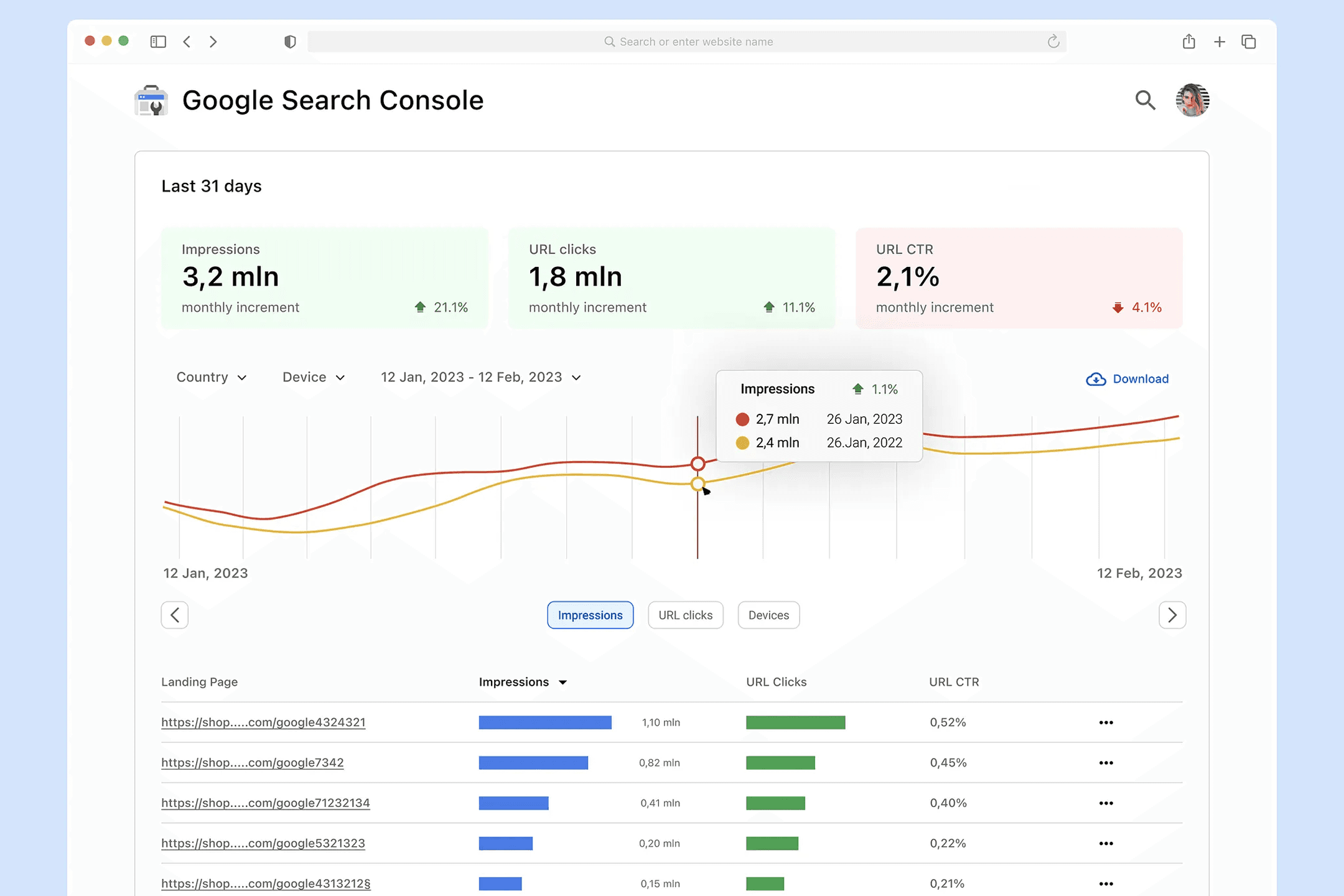
- Google Search Console connected: This helps you understand how people find you through Google Search, including queries, pages, clicks and impressions.
- Google Tag Manager installed: This makes it easier to manage tracking without hard-coding every change into the website.
- Important actions tracked: Forms, phone clicks, booking buttons, quote requests, email clicks, tool completions and key CTA clicks should be tracked where they matter.
- Key events marked in GA4: Not every event deserves the same weight. Mark the actions that actually matter to the business.
- Source data captured where possible: If someone fills out a form, it helps to know which channel, campaign or page influenced that enquiry.
- Behaviour tools used for specific questions: Use heatmaps or recordings when you need to understand how people are using a key page, not as a daily distraction.
- Privacy and cookie wording checked: If your website uses cookies, pixels or tracking scripts, make sure your privacy wording is up to date and appropriate for how your site collects data.
This setup gives you a strong base. You’ll still need some judgement and you'll need to look at the numbers in context. But at least you’ll be making decisions with more accuracy and strategic backing.
Measure what helps you decide what to fix next
The point of website tracking isn’t to stare at dashboards (although it's fun for some people). It’s to make better decisions about your website and marketing.
If you know a service page gets traffic but no enquiries, you can look at the offer, proof, copy, layout and call-to-action. Ifyou know mobile users rarely complete the form, you can check the mobile experience. If you know one channel brings weak enquiries and another brings stronger ones, you can spend your time and budget more carefully.
That’s where tracking becomes useful because it gives you a clearer view of what to fix first.
Sometimes the next step is CRO. Sometimes it’s better website foundations. Sometimes it’s SEO, tracking cleanup, landing page work, or a sharper offer. The right answer depends on what the data and page behaviour are showing.
Start simple. Run a website health check to understand the obvious technical issues. Then look at the commercial path: where visitors come from, what pages they land on, what actions they take, and what kind of leads those actions create.
If your bigger issue is that visitors are arriving but leads aren’t coming through, start with Your Website Gets Visitors.. So Where Are the Leads?. This article focuses on the tracking setup that helps you see what’s actually happening.
Frequently asked questions: